The Complete Guide to NaviLog: Your Offline Sailing Logbook
Everything the app can do — GPS trip logging, the anchor watch, MOB, the barograph, exports and backup — explained in ten minutes.
NaviLog is a free digital logbook for skippers, on Android and iPhone. It records your trips by GPS, stands anchor watch while you sleep, draws a barograph from your phone's own barometer, and keeps your data on your phone unless you choose to back it up. This guide walks through each feature the way you'd use it on a real trip.
1. First start: the permissions that matter
NaviLog needs location access and notification permission — alarms are useless if they can't ring.
- Android: allow location "all the time" for background tracking, and disable battery optimisation for NaviLog when asked. Android aggressively stops background apps to save power, and an anchor watch that gets stopped at 2 a.m. is a silent failure. While tracking or the anchor watch runs, you'll see a notification that lists everything that's active, for example "Anchor watch active – Also running: Tracking · Weather alarm". If you can see it, your watch is alive.
- iPhone: allow location "While using" at first. For uninterrupted all-day logging, "Always" is the most reliable choice (Settings → NaviLog → Location → Always).
In Settings you pick units (nautical miles or kilometres), language (English or German), time format and the GPS recording interval.
2. Recording a trip
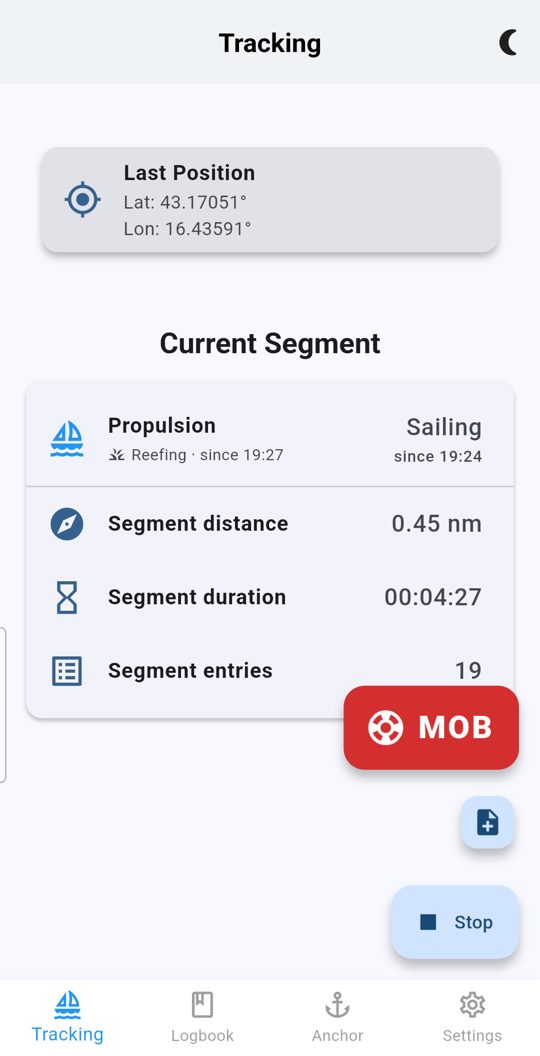
Tap Start, sail, tap Stop. Underneath, a lot happens:
- The GPS track is recorded in the background, screen off, no internet.
- Outlier fixes — the ones that teleport you 300 m onto the breakwater — are filtered out.
- Distance, duration, average and maximum speed are computed live.
- The tracking screen shows what's in effect — sailing, motor or anchor — with the time it was set. Reefing counts as sailing.
- Leave a bay without a new marker, and NaviLog reminds you. Markers can also be added or corrected afterwards.
- Add notes during or after the trip — sail changes, weather, that dolphin — plus crew and engine hours, which accumulate per trip and per yacht.
After the trip:
- The trip shows your track on the map with OpenSeaMap seamarks, and speed along the route below it — tap the curve and a marker shows the spot on the map.
- Pressed Start only once you were at sea? NaviLog offers to move the start back to the berth.
- The trip check finds forgotten markers (left a bay without one, no Stop) and suggests fixes. Only what you confirm is added.
- Drive times show sailing, motor and time at anchor or in harbour separately. Tap the total distance in the logbook for statistics across all trips.
- Deleted a trip by mistake? It stays in the trash for 30 days.
Tip: the GPS interval is configurable. Shorter intervals give prettier tracks; longer ones save battery on multi-day passages.
3. The anchor watch — set it up properly once
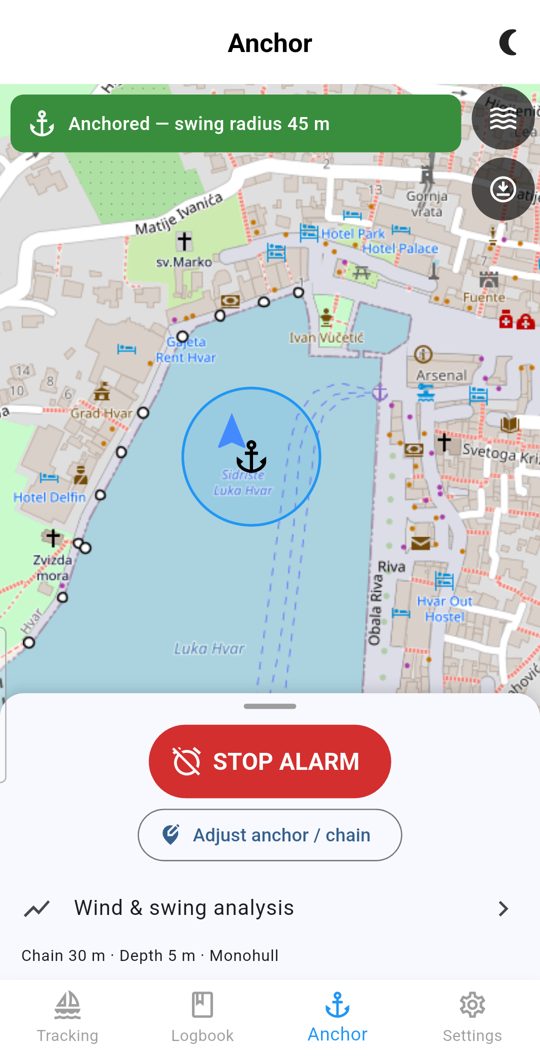
This is NaviLog's flagship feature, and it works differently from draw-a-circle alarm apps: it computes your actual swing radius from physics.
To arm the watch:
- Open the anchor screen. Your position is on the map; tap where the anchor actually lies, usually somewhere ahead of your bow.
- Enter chain length (what you actually paid out), water depth, bow height above water and boat length.
- Optionally add tide range, the mooring type or a second anchor; you can also restrict the alarm to a swing sector.
- Check the computed swing circle on the map, then arm the watch.
While the watch runs:
- A pre-alarm warns you before the boat crosses the real limit — you wake up while it's still a curiosity, not a crisis.
- If the phone loses its GPS fix, that raises its own alarm immediately.
- A battery warning fires before your phone dies quietly.
- Dropped the pin in the wrong spot, or paid out more chain? Tap Adjust — the watch stays armed with the previous geometry until you apply the new one. No unprotected gap.
- Wind and swing history are recorded, so in the morning you can see how the boat behaved. Past anchorages are kept in the anchor archive.
Android and iPhone: on Android the watch runs all night with the screen off; keep the phone plugged in. On iPhone, Apple limits background processing, so the anchor alarm is only reliable while NaviLog stays open on screen. NaviLog tells you this when you arm the watch and keeps the screen awake; turn off auto-lock and keep the phone on charge.
4. Man overboard (MOB)
The red MOB button is always available on the tracking screen — with or without an active trip. One tap:
- The position is marked instantly with the last known fix, then refined with a fresh high-accuracy fix.
- The MOB screen opens with live bearing and distance back to the mark.
- The mark is saved immediately and survives an app restart.
Practise it once in calm water, so the gesture is automatic when it isn't.
5. The barograph and the storm alarm — no internet needed
Most phones have a barometer, and NaviLog uses it on board, offline:
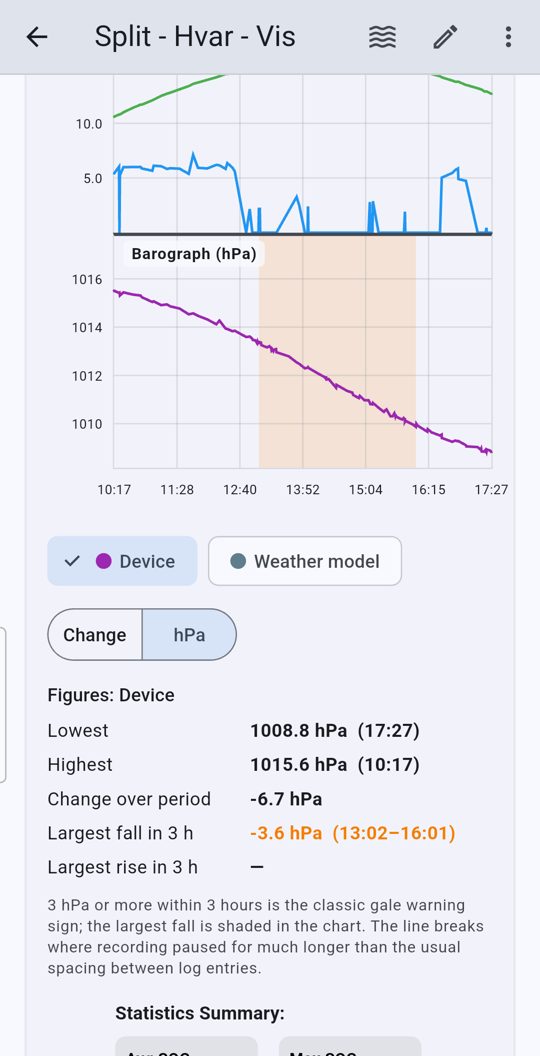
- The barograph shows the pressure curve from 6 hours to 7 days, with a plain-language reading: trough, ridge, accelerating fall. Tapping the barometer notification opens it directly.
- The storm alarm warns on a significant fall — a fall of 3 hPa in 3 hours is a classic gale sign — and also on a rapid rise, and names the time window.
- Every log entry saves the pressure at that moment, manual and back-dated entries too.
- Each trip's statistics show the pressure curve right below speed and temperature, with the biggest fall and rise.
The barometer is read in short bursts, not continuously, to save battery. If your phone has no barometer, NaviLog detects that and tells you; the rest of the app works as usual. When you're online, NaviLog also fetches marine weather and wind forecasts, and logs the weather with start, end, anchor, harbour and MOB entries.
6. Charts and the night watch
- Seamarks: toggle the OpenSeaMap overlay on any map — buoys, lights, fairways over OpenStreetMap.
- Offline regions (Pro): before you cast off, download the chart region you'll be sailing; the tiles are stored on the phone.
- Night-watch mode: a red-on-black interface for night passages. Red light spares your dark adaptation, so your eyes stay ready when you check the anchor screen at 3 a.m.
7. Crew, checklists and certificates
- Crew, skipper and yacht profiles: enter them once, attach them to trips and generate official crew lists for charter companies or port authorities.
- Checklists with templates — departure, safety briefing, engine check — or your own. You can attach photos, for example of a damaged part.
- Sea-miles certificates: when you need documented miles for a licence, NaviLog creates the certificate from your logged trips as a PDF.
8. Getting your data out (Pro)
- PDF — the complete logbook, now with a barograph page, plus sea-miles certificates. When exporting you choose what the map shows: GPS fixes, manual entries, MOB, sail and engine changes.
- GPX — tracks for OpenCPN, chart plotters or any GPS tool, with one track per day.
- CSV — trips, crew, skippers, yachts and the anchor archive; import supported.
9. Cloud backup (Pro)
Switch on cloud backup in Settings and sign in. Trips, checklists and GPS tracks are then backed up privately and appear on all your devices. Backed-up trips show a green cloud icon in the logbook. It syncs at most once a day in the background to save battery, and right away when you ask. Bought Pro on one phone? On a second device with the same store account, it's recognised automatically.
10. Where your data lives
- Your logbook sits in a local database on your phone. You don't need an account.
- Cloud backup is off until you switch it on, and you can delete your account from inside the app.
- Weather, place names and map tiles are the only other online features, and they only contact their services when you use them.
- Crew passports and personal data are excluded from Android's automatic device backup, and an armed anchor watch is never restored onto a new device.
11. Quick answers
Does NaviLog work without internet? Yes — tracking, the anchor watch, MOB, the barograph, the storm alarm and downloaded charts work offline. Only forecasts and place names need a connection.
Does it drain the battery overnight? The anchor watch uses GPS sparingly, and the app warns you when the battery gets low. Plug in overnight anyway.
Is it really free? The logbook, tracking, all alarms and the barograph: yes, free, no ads. Pro — exports, cloud backup, crew lists, templates and offline charts — is a one-time purchase, no subscription.
Is it a chart plotter? No — use OpenCPN or a dedicated plotter for route planning. NaviLog is your logbook and your watchkeeper.
Android or iPhone? Both. On iPhone, keep NaviLog open on screen during the anchor watch (see section 3).
Get NaviLog:
- Android: Google Play
- iPhone: App Store
- Website: navilogfleet.ch
More about NaviLog
- Why I built NaviLog — the offline sailing logbook with a real anchor alarm
- NaviLog questions answered — free or paid, offline, Android or iPhone, your data
- NaviLog Fleet: digital boat handover — for charter companies and sailing schools
Also on Medium: The Complete Guide to NaviLog: Your Offline Sailing Logbook